Task Route Mechanism
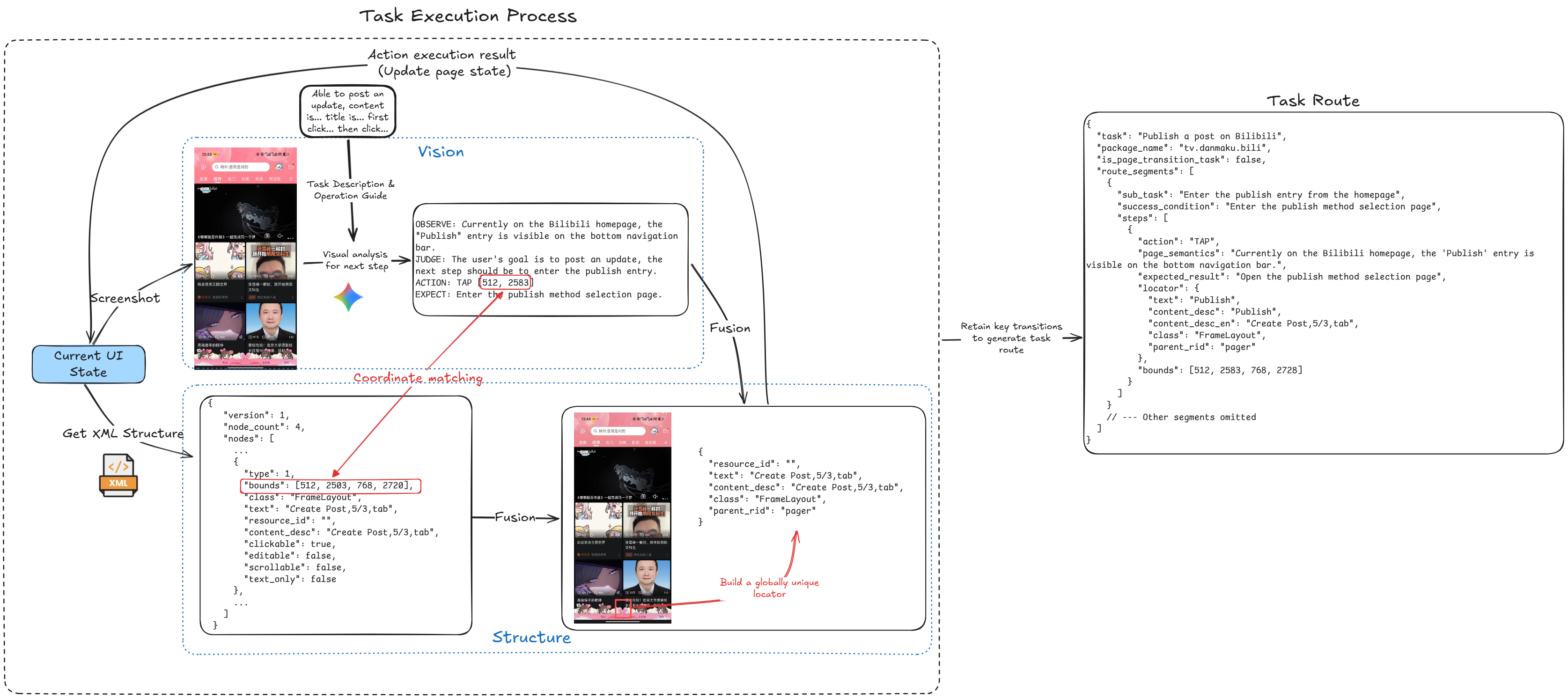
A task route is generated from a real task template run. It records useful navigation and operation evidence so the same template can run more deterministically next time.
Why routes are useful
Without a route, every run depends more heavily on the model observing the screen and deciding the next step. This is flexible, but slower and less stable.
With a saved route, AutoLXB can first replay known page navigation and stable actions. The vision model is then used for dynamic parts that still need judgment.
How a route is generated
During visual execution, AutoLXB records:
- Screenshots and model observations.
- Model actions and expected results.
- XML / accessibility nodes when available.
- Text, content description, resource id, class, bounds, parent features, and related UI attributes.
When the model clicks, inputs, or swipes, Core combines the visual action with the current UI structure. After the run, you can review these recorded actions and save useful ones as the template route.
Targeting strategy
For tap steps, AutoLXB now uses two targeting modes:
- XML locator targeting: use text, content description, resource id, class, parent relation, index, and bounds hints from the accessibility/XML structure.
- Semantic tap targeting: when a unique XML locator cannot be built or resolved, use the recorded instruction, expected result, page context, and screenshot to locate the target semantically.
Local reuse and cross-device import
On the same device, saved routes are optimized for local repeatability.
Across devices, coordinates may not transfer perfectly because screen size, font scale, app version, and login state may differ. Portable routes therefore use semantic tap descriptions instead of container probes or local tap points when an XML locator is unavailable.
When a route fails
A route may fail if:
- The app UI changed.
- A popup or ad blocks the page.
- The target account state is different.
- A semantic tap target cannot be found confidently on the current screen.
When this happens, AutoLXB can fall back to visual execution. Use Trace to see which route step failed and why.