Task Overview
The Tasks page is organized around Quick Tasks, Task Templates, and Workflows.
- Quick Tasks run one natural-language task immediately without saving long-term automation.
- Task Templates store reusable task units: name, description, target app, user playbook, TASK_DECOMPOSE switch, and one primary route.
- Workflows sequence one or more templates and may have one trigger: none, schedule, or notification.
Task execution flow
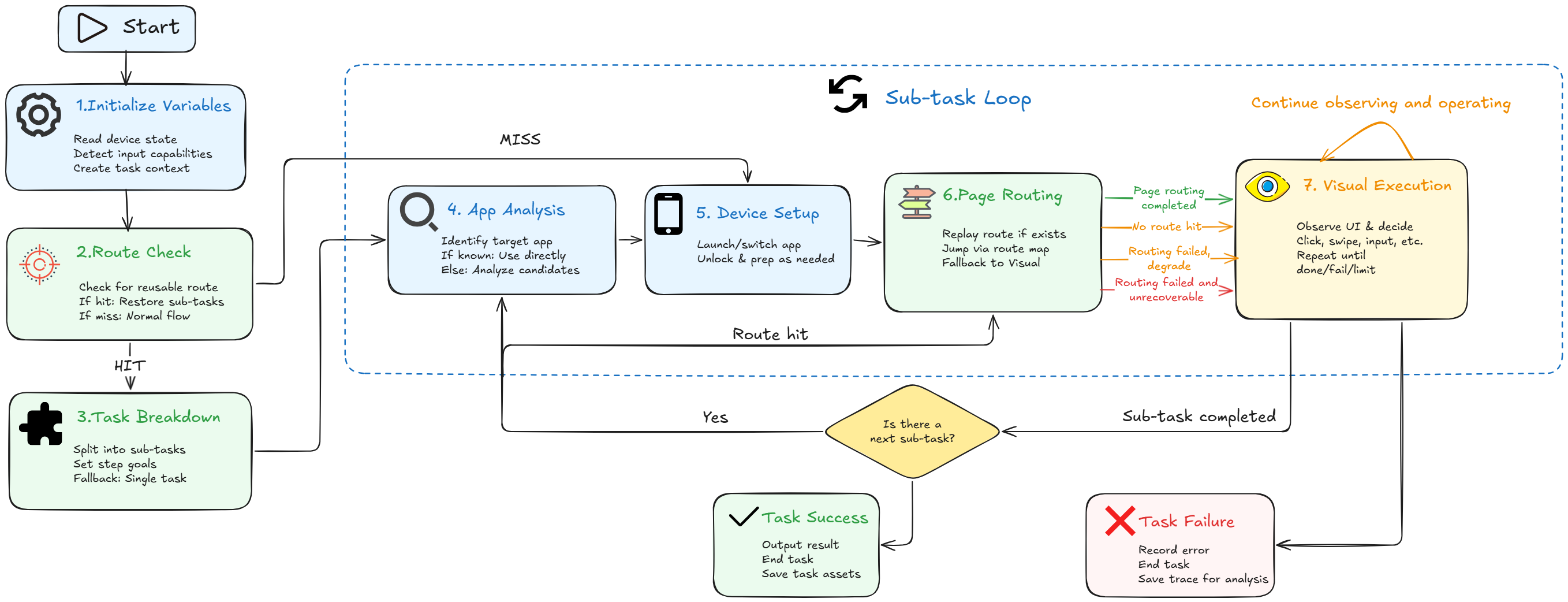
The following diagram shows the general flow from run start to finish. As a user, you do not need to memorize every internal state. The important idea is: AutoLXB prepares the device and task context, tries to reuse the template route for stable page navigation, then uses the vision model for dynamic UI decisions.
In plain words:
- Preparation: read device state, app state, input capability, and runtime context.
- Route check: if this template has a saved route, AutoLXB tries to use it first.
- Normal execution: if there is no route or the route cannot be used, AutoLXB analyzes the task, opens the target app, and navigates normally.
- Visual execution: when the current page must be understood or operated, the vision model observes the screen and chooses actions.
- Finish or fail: after completion, the result is recorded. If it fails, inspect Trace for the reason.
Which entry should I use?
| Object | Best for | Example |
|---|---|---|
| Quick task | Temporary execution, trial runs, model testing | "Open WeChat and send hello to File Transfer." |
| Task Template | Reusable task text, target app, playbook, and primary route | "Open the app and complete check-in." |
| Workflow | Ordered template execution with optional trigger | Run check-in and status lookup every morning at 9:00. |
Recommended workflow
- Try it as a quick task first: confirm that the model understands the task and the phone can click, swipe, and input normally.
- Create a template after it is stable: save the description, target app, playbook, and TASK_DECOMPOSE switch.
- Save a route after a successful run: route reuse can reduce model calls and improve repeatability.
- Create a workflow when automation is needed: add existing templates, arrange the order, then choose a schedule or notification trigger when needed.
- Use Trace when something fails: Trace shows which phase failed and why.
Task routes in one sentence
A task route is a reusable local path generated from a successful template run. Routes belong to templates. Workflows call templates in order and use each template's own route.